Guides / 3D games on phones
How I keep a 3D browser game smooth on a phone
A browser game has no install step and no idea what device it will land on. These are the rules I follow in Tray Rush to stay smooth on a modest phone, with the real numbers from the game's code and my own test reports.
Start with a download budget
When I rebuilt Tray Rush in October, I set a limit: the first visit may download 3 MB at most, character models included. That build came in at 2.50 MB on disk and about 1.69 MB over the network once compressed:
| File | On disk | Sent compressed |
|---|---|---|
| Script (the game and three.js) | 1,081 KB | 311 KB |
| Stylesheet | 30 KB | 8 KB |
| Page | 21 KB | 5 KB |
| Three character models | 1,364 KB | about the same, they are already binary |
Two choices keep it that small. There are no model files for the rooms: the diner and the cabin are built in code from simple shapes when the game starts. And there are no sound files: every sound effect and every bar of music is made by the browser while you play. The only real downloads are the code and three people.
Start at the right quality
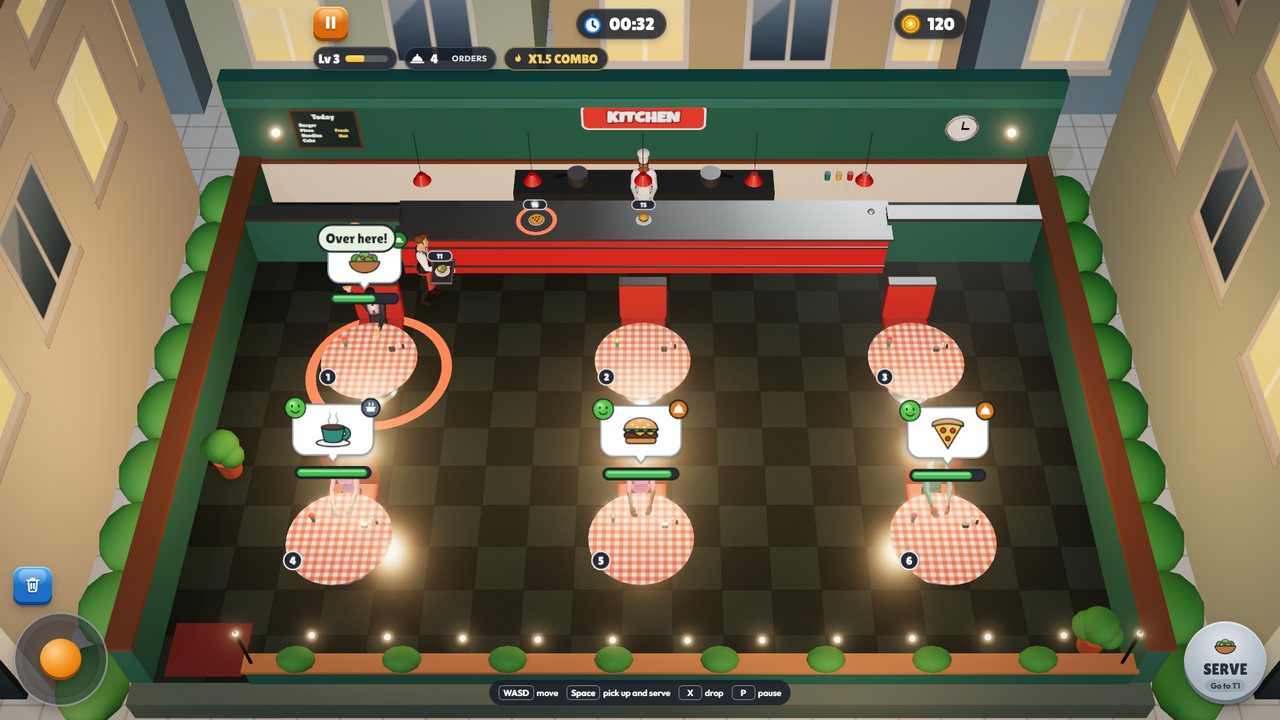
Tray Rush has three quality tiers. The top tier draws shadows and a soft glow on lamps and highlights, with four samples per pixel to smooth the edges. The middle tier keeps the glow but smooths edges with a cheaper filter. The bottom tier turns the glow and the shadows off and draws at one pixel per screen pixel.
The game picks a tier before the first frame, so the picture doesn't change a moment after it loads:
- A touch screen with four or fewer processor cores counts as a low-end device. It starts in the middle tier, with shadow maps of 1024 pixels instead of 2048, and it draws at most 1.5 pixels for every layout pixel instead of 2.
- Intel integrated graphics start one tier down as well. Smoothing the glow's edges made those chips stutter several times a second at full HD, so above 1.2 million pixels they start in the bottom tier.
- Everything else starts at the top.
Then watch the frame rate
Guessing from the hardware only gets close, so the game also measures itself. Every 2 seconds it looks back at the frames it drew. If it averaged under 40 frames a second, or if more than 5% of the frames took longer than 50 milliseconds, it drops one tier. It only ever steps down, never back up, so the picture doesn't flicker between tiers. When it steps down, it prepares the new tier's shaders in one go, so the change itself doesn't cause a stutter. Frames longer than a quarter of a second are ignored, because those come from switching tabs or loading, not from a slow phone.
Draw fewer things
Phones are slowed down less by how detailed a scene is than by how many separate things the graphics chip is asked to draw. So before the first frame, every piece of the room that shares a material is merged into one shape. When I planned the clean-up of Tray Rush in October, I wrote down what the game was doing and what it should do:
| Measure | Before the clean-up | Budget |
|---|---|---|
| Draw calls per frame | 50 to 66 | 70 or less at the top tier, 45 or less at the bottom |
| Triangles per frame in the diner | about 140,000 | 90,000 or less |
| Point lights by day | 6 in the diner, 2 on the plane | none by day, 3 or fewer at night |
| Shaders compiled during play | 24 to 50 | none: all compiled after the venue loads |
| Memory used by the game's code | 24 to 41 MB | 60 MB or less |
I run an automated check that compares a build against those budgets, so a new prop or effect that quietly costs too much shows up before it reaches you.
No surprises in the middle of a shift
The worst stutter is the one that happens the first time something appears, such as the first combo of the game, because the browser is building the shader for it on the spot. Tray Rush builds every shader it will need as soon as the venue loads, so nothing has to be built during play.
Phones also take the graphics away from a page when memory runs short. When that happens the game pauses the shift and says so, waits up to 8 seconds for the browser to hand the graphics back, then rebuilds the lighting and carries on where you left off. If they never come back, it asks you to reload. Switching to another app or tab pauses the shift and silences the sound, so no order runs out while you are away.
Protection that costs nothing
The game's code is scrambled before release to make it harder to copy. I measured whether that slows anything down, timing the game's logic and animation on a busy level 4 floor. The diner took 0.28 milliseconds a frame before and 0.32 after; the airplane took 0.58 before and 0.53 after. Both differences are inside the normal variation from one run to the next.
My first attempt was not free. It also scrambled short words such as walk and idle, which the game compares on every frame for every person in the room, and that doubled the airplane's time. Short single words now stay plain, and only longer text is scrambled.
What I can't measure from my desk
My automated tests run in a browser without a graphics card, so they can check that the game works on eight screen sizes but not how smooth it feels. The frame rates I aim for are 55 frames a second on laptops, 45 on mid-range phones and 30 on low-end phones at the bottom tier, and the only way to check those is on real devices.
If shadows disappear during a shift on a recent phone, the game has stepped its quality down, which means your phone was struggling. I would like to know about it: the bug report form takes the phone model and the browser, and that is exactly what I need to look into it.
Keep reading
How Tray Rush was made tells the rest of the story, from the restaurant that inspired it to the visual update. Every release is checked by a bot before it goes out, and How a bot plays Tray Rush explains what it checks.
I write these guides with help from Claude, an AI assistant, and check every number against the game's code and test reports before a guide goes up.